 DravyaOS
A chemist moves from Marg to a new package, bills the same day's sales, and finds the profit percentage is lower. The rupees are identical. The percentage isn't. It is not a bug, and your shop did not get less profitable overnight. The two packages are dividing by different numbers.
The Marg figures below are what its sale screen showed on the bills we checked. Screens differ by edition and setting, so confirm against a bill of your own before you rely on the exact wording.
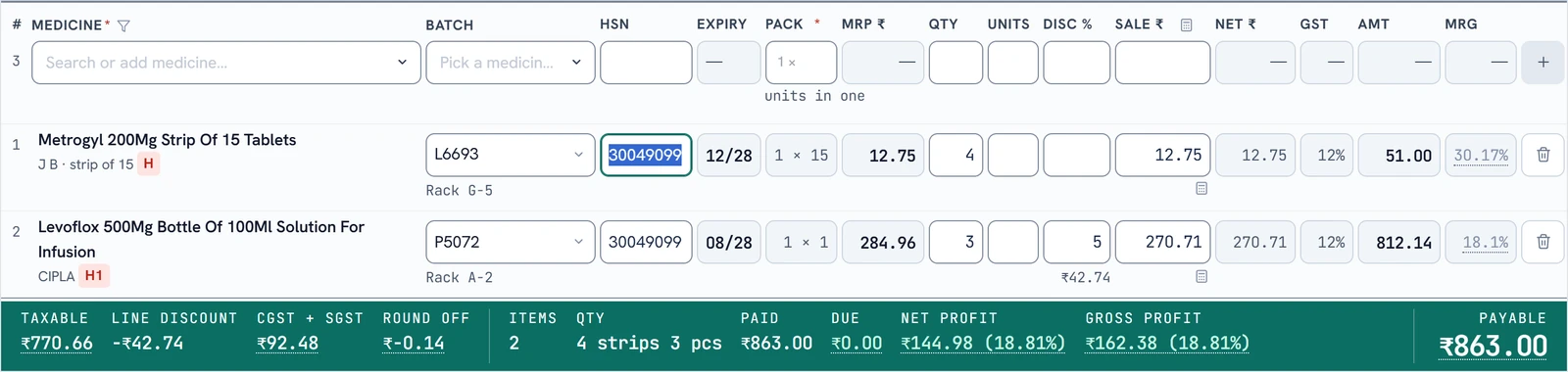
The same bill, two percentages
Take 10 strips sold at ₹16 each with a 5% discount, ignoring GST to keep it simple. Each strip cost you ₹12.
- Sale value after discount: 10 × ₹16 less 5% = ₹152
- Cost: 10 × ₹12 = ₹120
- Profit: ₹152 − ₹120 = ₹32
Now the percentage. Divide ₹32 by the cost (₹120) and you get 26.67%. Divide it by the sale value (₹152) and you get 21.05%. Same ₹32. Marg's Profit % is the first number. DravyaOS shows the second.
Markup and margin, in one line each
- Markup = profit ÷ cost. "I put 26.67% on top of what I paid."
- Margin = profit ÷ sale price. "26.67% of each rupee I take in is not mine, but 21.05% of it is."
Markup is always the bigger number, because cost is smaller than the sale price. That is why a shop moving from a markup-style screen to a margin-style one sees the figure drop. The same goes for Marg's Default Margin field: a value of 33.33% there is a ₹16 sale on ₹12 cost, which is a 25% margin.
A conversion table you can keep
If someone quotes you a "margin" of 20%, ask which way they divided. This is how the two line up:
| Markup on cost | Margin on sale price |
|---|---|
| 10% | 9.09% |
| 20% | 16.67% |
| 25% | 20% |
| 33.33% | 25% |
| 50% | 33.33% |
| 100% | 50% |
The two formulas, if you want to do it on a phone: margin = markup ÷ (1 + markup), and markup = margin ÷ (1 − margin). With markup as a fraction, 0.2667 ÷ 1.2667 = 0.2105. That is the 21.05% above.
Why it matters beyond the screen
The danger is not the label. It is the decisions made off it.
- Pricing. If you want a 20% margin and add 20% to your cost, you have priced for a 16.67% margin. On a slim-margin generic strip that gap is the whole difference between a profitable shelf and a busy one.
- Distributor talk. Distributors and company reps often quote margin off MRP or PTR. If your own yardstick is markup on cost, you will compare apples with oranges every time a scheme is offered.
- Your accountant. Gross profit in the books is a rupee figure, and gross profit percentage is almost always taken on sales. A margin on sales is the one that reconciles.
What DravyaOS shows, and where
In DravyaOS the percentage on a bill is the margin on the sale price, and the cost behind it is the lot's landed cost: what that batch really cost after the supplier's discount, scheme and free goods. Both the profit and the cost are before GST, since the tax you collect was never yours. The profit you see on the bill, in the sales list, and in the Profit and Loss report all use that same definition, so they cannot disagree with each other.
When you are setting a price rather than reading one, the rate calculator (F7 in a rate field) shows both numbers side by side: the margin on the sale rate and the markup on the net rate. Type whichever one your distributor or your habit speaks in, and the other moves with it. There is more on that in pricing a medicine with the rate calculator.
Checking it yourself in two minutes
- Open any bill and note the net sale value (before GST) and the cost.
- Subtract to get profit. This should match the rupee profit on both screens.
- Divide by cost for the markup, and by sale value for the margin.
- Compare with the percentage the package shows. One of the two will match.
If the rupee profit differs between two packages, that is a different question, usually which cost was used. A package that costs a sale at the last purchase rate will not match one that costs it at the actual batch. We cover that in MRP, PTR, PTS and margins explained.
See the margin on every line, worked out on the sale price.
Download DravyaOS for WindowsThinking of moving over? Read how to switch from Marg without losing your history.