 DravyaOS
DravyaOS vs Zoho
Some pharmacies bill on Zoho Billing, Inventory, or Books. Zoho is excellent general accounting software — but it's cloud-only and not pharmacy-native. Here's the honest comparison.
Checked against DravyaOS v2.8.3 · 1 August 2026
Stay with Zoho if…
- You want a deep, well-integrated SME business suite beyond billing.
- You already use Zoho CRM, Analytics or Creator.
- You want to build custom workflows on a low-code platform.
Switch to DravyaOS if…
- You need pharmacy concepts — batches, expiry, salts, Schedule H1 — out of the box.
- You need billing that works with no internet.
- You want a bundled medicine catalog rather than an empty item master.
The bottom line
a year, for the whole shop.
Zoho is a limited free tier, then paid plans per user per month. DravyaOS is one price per shop — Windows counter and Android phone, every feature, unlimited devices and staff logins — with no per-seat licence and no annual maintenance fee. It goes to ₹5,499 on 1 January 2027; subscribe before then and ₹2,499 stays your price for as long as you stay subscribed.
Zoho Billing / Books / Inventory have free tiers with limits and paid plans per user per month above them. Pharmacy-specific behaviour is not part of the product — you would be building it out of a general accounting toolkit.
Feature by feature
Every row that changes a working day
Grouped by what you'd actually be weighing. Where we don't have a confident read on Zoho, the cell says so rather than guessing.
| What matters at the counter | DravyaOSOffline-first · synced | ZohoFree tier, then per-user plans |
|---|---|---|
| Money & termsWhat it costs to run, and what happens when you want to stop. | ||
| Cost to run the shopThe bill you pay every year just to keep billing. | Talk to us | Free tier + paid plans |
| Cost to add a second counterMost pharmacy software charges per seat or per branch. | Nothing — no per-seat fee | Per user, per month |
| Trying it before you commitWhether you have to talk to a salesperson to see the software. | Try mode, no account needed | Free tier |
| Getting startedHow long from deciding to billing your first customer. | Download & run in minutes | Cloud sign-up |
| Offline working & your dataWhat happens when the internet goes, and who holds the master copy. | ||
| Works with no internetA counter that stops when the line drops is a counter that stops. | Always — local-first | No — cloud-only |
| Automatic cross-device syncThe counter PC and your phone showing the same stock. | Built in, offline-first | Cloud-based |
| Backup & restoreGetting your shop back after a dead hard disk. | Local + synced copy | Vendor-managed |
| At the counterThe twenty seconds that repeat three hundred times a day. | ||
| Built for a pharmacyWhether batches, schedules and salts are native or bolted on. | Purpose-built | Generic accounting / inventory |
| Built-in medicine databaseWhether you type your first 8,000 medicines in yourself. | Bundled catalog | No |
| Keyboard-only billingReaching for a mouse mid-queue is the whole cost. | End to end | Mouse-oriented web |
| Salt / substitute finderThe brand is out of stock and the customer is standing there. | One keystroke | No |
| Free goods carried through to the customerThe 10+1 you were given, passed on without arithmetic. | Pre-filled from the purchase | Not that we can find |
| Catches a mis-keyed priceBelow cost, above MRP, or discounted past its own value. | Flagged as you type | Configurable rule |
| Pack photos at the counterRight strip, right box, when the name is nearly identical. | Bundled catalog, automatic | On invoice PDF |
| Stock, expiry & distributor claimsWhere a pharmacy quietly loses money it could have claimed back. | ||
| Batch & expiry trackingTable stakes — every serious tool does this. | Built in | Yes |
| Each distributor's return windowEvery distributor stops taking stock back at a different point. | Months-before-expiry, per distributor | Not that we can find |
| Claim-by date on every batchExpiring stock is only money if the claim goes out in time. | With days left, closing-soon first | Not that we can find |
| Short-book reorderWhat to order, grouped by who you order it from. | Grouped by distributor | Not that we can find |
| Compliance & paperworkThe things an inspector or a CA asks for. | ||
| GST-ready invoicingTable stakes. | Yes | Yes |
| GSTR-1 & GSTR-3BThe returns themselves, not just the tax on the bill. | Built in | Yes |
| Schedule H1 / X registerA legal requirement, and the thing most tools bolt on. | With prescriber address on the bill | No |
| Catches a mis-tagged schedule drugA register is only as good as the tagging behind it. | Reads composition, you approve | Not that we can find |
| Print, share or save any documentInvoice, receipt, both notes, both statements — one bar. | A4/A5 · print, share, PDF | Print + share |
| Documents dated to your shop's dayA bill raised at 12:30am shouldn't land in last month's return. | Your day, not UTC's | Varies |
| Delete & restoreWhether one wrong click can take history with it. | Refused, or undoable | Use Void |
| Knowing what to do nextReports you run yourself vs a tool that tells you. | ||
| ReportsHow much you can ask without exporting to Excel. | 47, indexed & searchable | Deep — accounting |
| Tells you what to act on todayNobody runs twelve reports on a Tuesday morning. | Six findings, ranked by money | Not that we can find |
| Profit on each billWorst first, with credit notes netted onto the bill. | Built in | Varies |
| Doctors & referral commissionSet a rate on a prescriber, see what each is owed. | Screen + two reports | Not that we can find |
| Supplier & customer statementsA running balance you can hand over or send. | Both, bill by bill | Yes |
| Reach & switchingWhere it runs, whose language it speaks, and how you get in. | ||
| Runs onWhether the phone is the whole app or a viewer. | Windows + Android — full app | Web + mobile |
| Works in your languageThe staff member billing may not read English. | 7 Indian languages + English | Yes — 6 Indian languages |
| Send on WhatsApp or SMSHow a customer actually receives their bill. | Bills, receipts, notes, statements | Yes |
| Online store & ordersTaking an order without answering the phone. | Built in — retail or trade | Yes — Zoho Commerce |
| Import from your old softwareThe single biggest reason shops don't switch. | CSV, PDF & photo — AI-read | Not that we can find |
| InterfaceHow long a new hire takes to become useful. | Rebuilt for today | Modern web |
Not a mockup
The rows above, in the actual app
The bill, without the mouse
Medicine, batch, quantity, payment, print. Every step has a key, the batch list is already sorted by what expires first, and the line turns red before you save if the rate is below cost or above MRP. The queue doesn't wait for you to find a dropdown.
- Search by brand or by salt — the substitute finder is one keystroke
- Free goods pre-fill from the 10 + 1 the batch was bought on
- Split one bill across cash and UPI and the day-close still matches
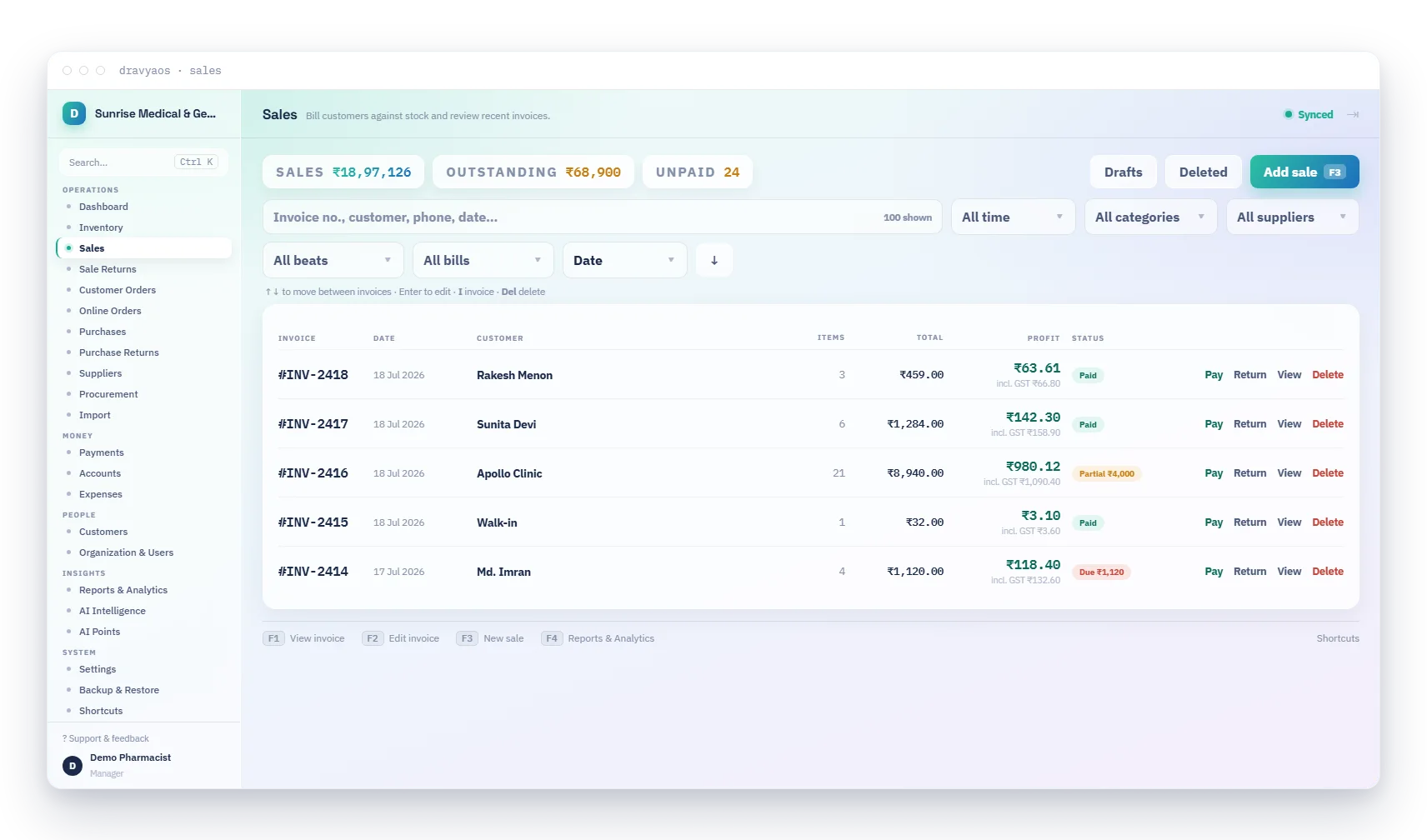
New sale — the whole bill without touching a mouse
47 reports, and a way to find the one you want
Sales and profit cut by medicine, customer, company, HSN, staff, doctor and beat. GSTR-1 and GSTR-3B. Day book, collections by tender, profit per bill worst-first, stock movement, and a Schedule H1 & X prescription register. Search matches how you'd say it — “party wise”, “distributor”, “stock statement”.
- Open any report by name from the command palette, anywhere
- Every report exports to CSV and prints on A4 or A5
- Stock valued at cost, MRP or selling price — named on the page
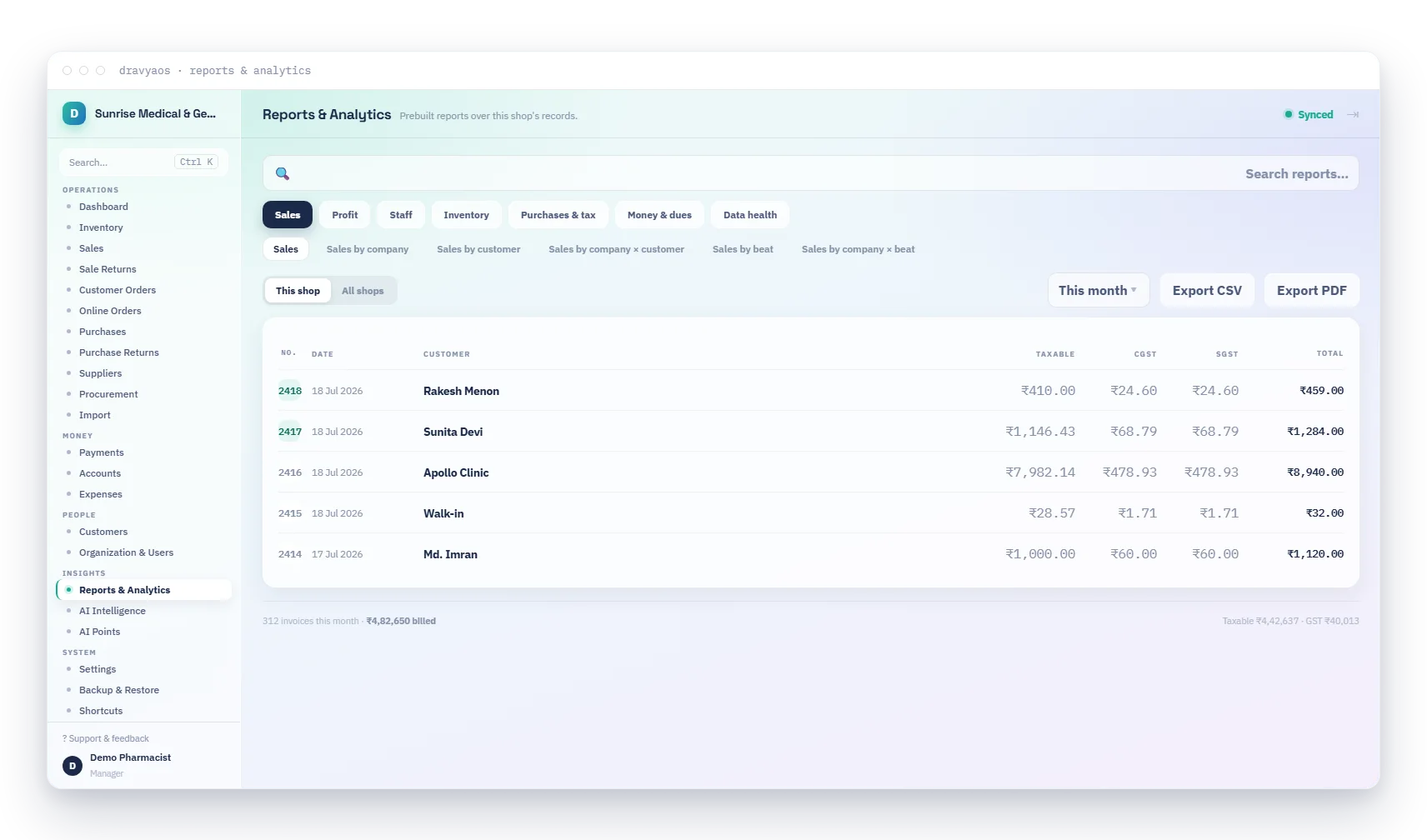
Reports — 47 of them, searchable by the words you'd use
It tells you what to do, not just what happened
Nobody runs twelve reports on a Tuesday morning. The app reads your own ledger and surfaces six findings, ranked by the money attached: stock running short at the rate it's really selling, stock that hasn't moved, batches expiring faster than you'll sell them, purchase rates that crept up, regulars overdue for a refill, and scheduled drugs billed with no prescriber.
- Every finding opens the screen where you'd act on it
- Works entirely offline — it's your data, read locally
- The figures behind each finding are shown, not hidden
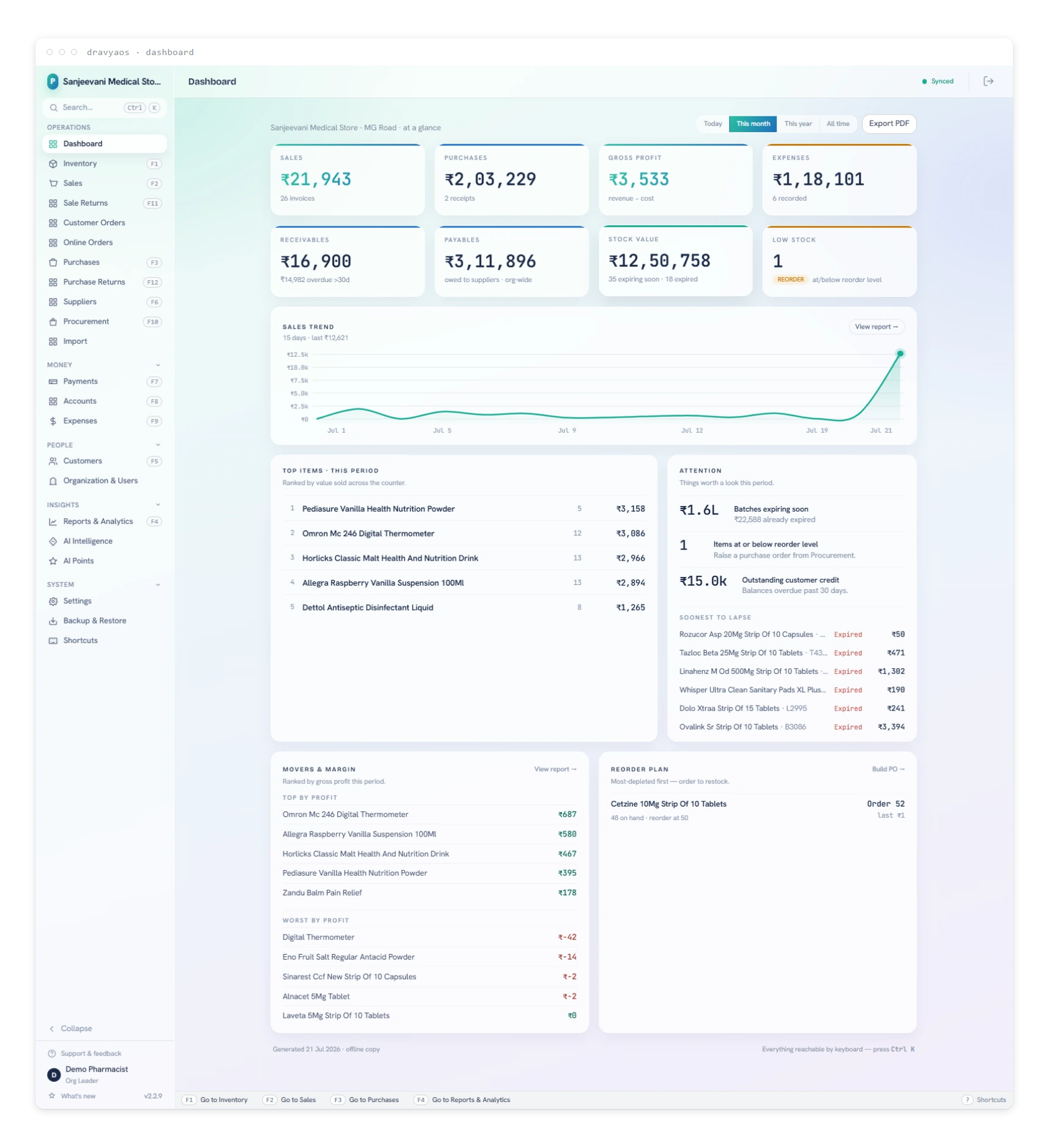
The dashboard leads with what's worth acting on
The honest part
Where Zoho is genuinely better
No comparison written by one side is neutral. Here's where we'd tell you to stay put.
- A deep, well-integrated business ecosystem — Books, CRM, Analytics and Creator all speaking to each other.
- Genuine platform extensibility through low-code Creator, if you have someone to build with it.
- Mature multi-currency and multi-entity accounting, well past what a counter tool needs.
Moving across
Getting off Zoho without losing your stock
The single biggest reason shops don't switch. It's four steps, and your old software stays exactly where it is.
01
Get your data out
Whatever your current software exports — stock, customers, suppliers, outstanding balances. A CSV is ideal, but a PDF or even a phone photo of a printed list works.
02
Let the import read it
AI import takes CSV, PDF and photos, and handles a catalogue of about 35,000 rows in one go. It maps the columns itself — you review what it found before anything is saved.
03
Check the openings
Opening stock, and what each customer and distributor owes you, bill by bill. Opening bills stay editable afterwards, so a wrong figure on day one isn't permanent.
04
Bill on day one
Your old software stays installed and untouched for as long as you want it as a reference. Nothing is deleted, and nothing about DravyaOS expires.
Questions
DravyaOS vs Zoho, answered
What does DravyaOS cost?
₹2,499 a year for one shop — every feature, unlimited counters, devices, medicines, invoices and staff logins. That is a launch price: it goes to ₹5,499 on 1 January 2027, and subscribing before then keeps you at ₹2,499 for as long as you stay subscribed. Two shops start at ₹6,399 a year. Try the whole system free for 30 days first, no card and no account needed to install. Setup and migration is ₹599 once; the AI add-on is ₹299 a month and optional. No AMC and no per-seat charge for a second counter.
What happens to my billing if the internet goes down?
Nothing. DravyaOS keeps the master copy of your data on your own machine and works entirely offline — billing, stock, returns, reports, printing. Sync is how your devices catch up with each other when a connection is there; it is never something the counter waits for.
If the data is on my machine, what happens if the machine dies?
Your data is on your machine and, if you've signed in, mirrored to your other devices. Restoring is a matter of installing DravyaOS on the new machine and signing in. You can also take a local backup at any time.
Can I keep my old software running while I try this?
Yes, and we'd suggest it. DravyaOS doesn't touch your existing installation. Import a copy of your data, run both for a week, and only stop the old one when you're satisfied.
How do I get support?
Email help@dravyaos.com — a question, a bug or a request all go to the same place.
Keep reading
Other comparisons & guides
DravyaOS vs TallyPrime →
Licence + annual TSS.
ComparisonDravyaOS vs Vyapar →
Mobile free, desktop paid.
ComparisonDravyaOS vs Marg ERP →
Paid licence + annual AMC.
GuideHow to switch pharmacy software without losing your stock →
What to export, what to check, and how to run both in parallel.
GuideOffline pharmacy billing software →
Why local-first matters more than a cloud dashboard.
GuideThe best free pharmacy billing software in India →
What “free” actually means across the options.
Compiled from publicly available information and last checked on 1 August 2026, against DravyaOS v2.8.3. It reflects our understanding of Zoho's standard offering; where we couldn't confirm something, the table says “not that we can find” rather than asserting it's missing. “Zoho” and other product names are trademarks of their respective owners; DravyaOS is independent and not affiliated with, endorsed by, or partnered with them. Features and pricing change — if you spot anything out of date or wrong, tell us and we'll correct it.
Try it against Zoho yourself
Run both for a week. Download the whole app — no account needed, no sales call. Free for 30 days, then ₹2,499 a year per shop.