 DravyaOS
The question every owner asks sooner or later is: "What did we sell today?" If the honest answer involves driving to the shop or waiting for the manager to read it out, the software is a tally, not a window. Sync is the difference. A bill rung up at the counter should be on your phone almost as soon as it is saved, and a change you make from your phone should reach the counter just as quickly.

What "about a second" means
Every device in your organisation holds a request open to the server. When another device saves something, the server answers that open request straight away and the change arrives, usually within a second. A once-a-minute check runs as a safety net underneath, so a device that missed the nudge still catches up.
The result: a bill on the counter PC, a purchase entered in the back office and a payment recorded on a phone all end up in the same place, on every device, without anyone pressing a sync button.

When the line drops, the counter keeps billing
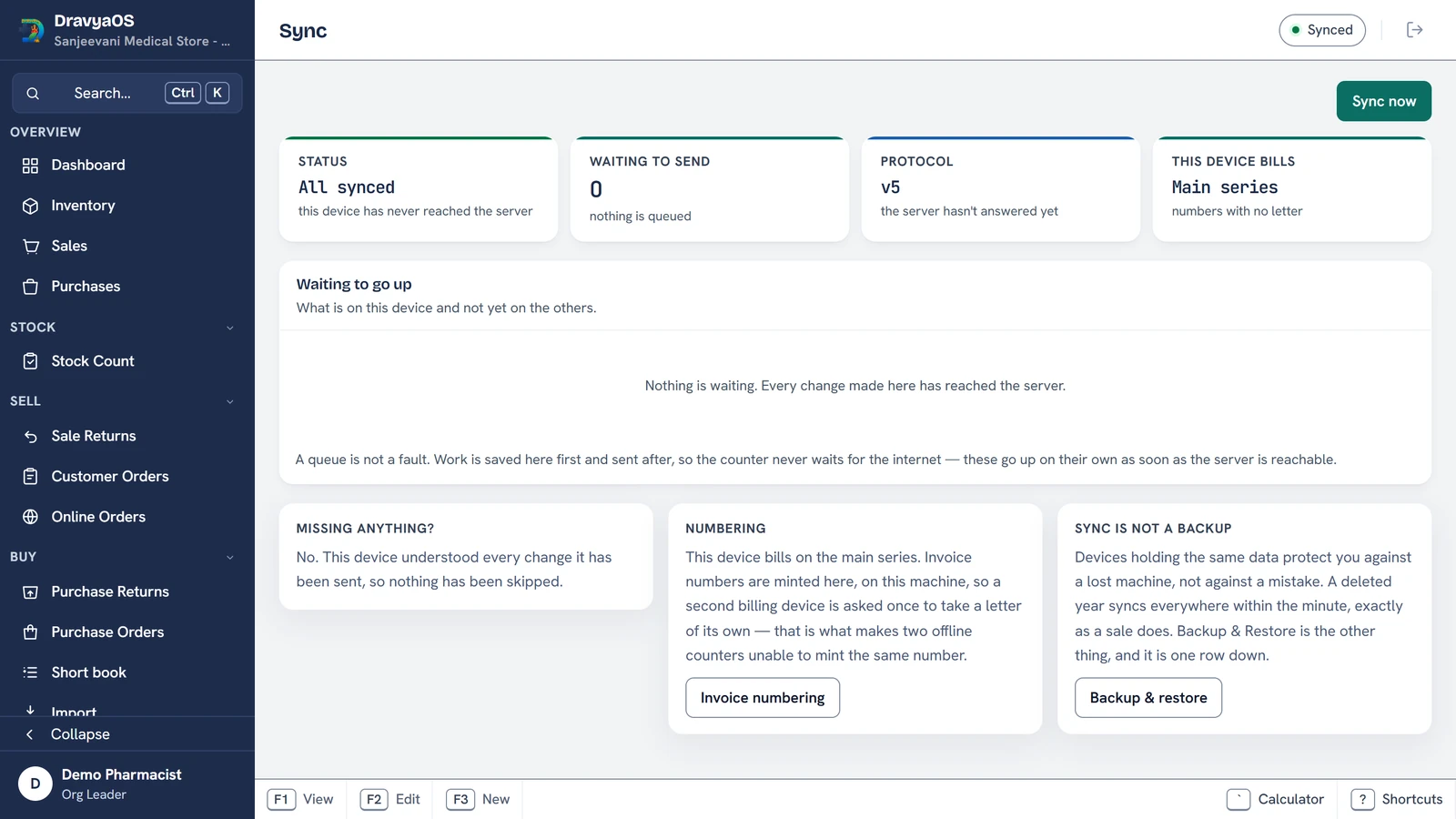
Every bill is written to the device first and sent after. If the internet goes, billing carries on exactly as before and the changes wait in a queue. When the line returns they go up in the order they were made. The Sync screen shows what is queued and for how long, per table, and when the device last reached the server. It reads everything from the device itself, so it stays accurate when there is no network, which is when you most want to look at it.
Two small touches from real shops: a sign-in made before the internet is up finishes by itself on the next pass that reaches the server, so the bills keyed in the meantime go up without logging out and in. And a device that has no session says so on the Sync screen, rather than showing a reassuring "last synced a moment ago" over a queue that isn't moving.
Two counters, no duplicate invoice numbers
This is the part that bites multi-counter shops. If two computers each hand out "the next number" while they cannot see each other, both will print invoice 130. DravyaOS gives each computer its own series. Tag the second machine and it bills 130-B while the first bills 130, so the two can never mint the same number. If a shop already has a clash from before, the Sales screen lists it and clears it in one click: the first document keeps the number and the rest gain a letter (97 and 97/A).
GST returns respect this too. Table 13 reports each series as its own consecutive range, so the declared range and count still reconcile on the portal.
Two people on the same bill
A half-typed bill saves itself as a draft from its first line, so a power cut loses nothing. If another counter posts or discards that draft while yours is still open, Save refuses it with a plain message (This draft was already billed on another counter) instead of billing it twice. When two devices edit the same record at the same time, the later edit wins, the crossed edits are flagged with a field-by-field diff, and one click restores the other version. Our longer piece on how local-first sync resolves conflicts goes into the mechanics.
PCs in the same shop can find each other
On Windows, the PCs in one shop connect straight to each other over the shop's own network. The server only introduces them, and from then on the link stays up even when the internet drops. Each PC shows its name, address, version and state on the Sync screen. A Can't reach usually means guest Wi-Fi or an antivirus firewall keeping them apart. To be clear about where this stands: today that direct link is the groundwork. Changes still travel through the server, and nothing syncs over the shop network yet.
Is every device the same version?
A Devices panel lists every device in the organisation with its user, its app version (flagging one that needs an update), whether it holds the live connection, and how fast changes from elsewhere reached it over the last week. If the owner's phone feels slow to update, that is where you see why. Devices that are behind on updates keep syncing, and tolerate data they don't understand yet, so a branch running an older version does not stall the others.
Put tonight's takings on your phone, not in your head.
Download DravyaOS for Windows