 DravyaOS
Vijay Nair walks in, pays, and leaves. The tablets are for his wife, Swathi. The doctor who wrote the prescription is the one at the clinic two lanes down. On a paper bill, all that survives is "Vijay Nair, ₹412". Three months later, when Swathi's medicine is due again, or when an inspector asks who a Schedule H1 pack went to, nobody can say.
Keeping a proper record isn't hard. It only fails when it costs the counter an extra minute per bill. Here is how to capture who it's for, who prescribed it and the paper itself without slowing the queue, and what to do with the records afterwards.
The customer pays; the patient takes
The first mistake is treating the payer and the patient as one person. A family usually buys through one member, and the dues, the phone number and the credit limit belong to that member. The medicines belong to whoever is taking them.
Keep both. The bill is raised on the customer, so the ledger and the dues stay with the person who settles them. Beside it, name the patient: for Swathi (wife). The printed bill carries it, and so does the Schedule register. Each patient needs only a name to begin with. When there is time, add the relation, an age or date of birth, and a phone. Store a date of birth rather than an age and it stays correct on its own as the years pass.
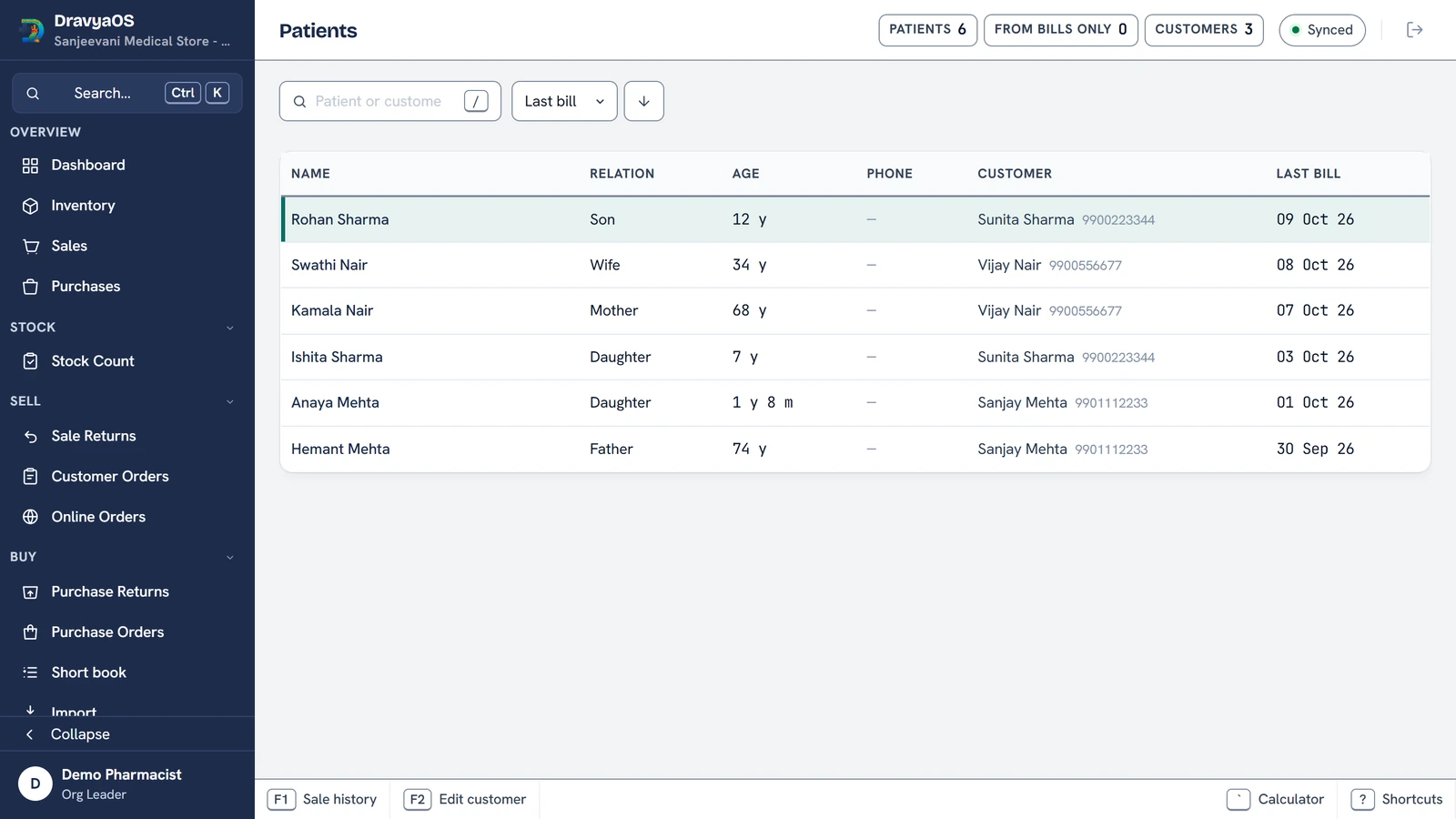
One practical detail: a new name typed on a bill is filed as that customer's patient when the bill saves, so you build the list by billing, not by data entry. Names that appear only on old bills still show up, greyed, until you edit them. A walk-in has no one to file a patient under, so for them the field stays plain text.
Who prescribed it, in the same breath
For Schedule H, H1 and X medicines the bill asks for the prescriber: the doctor's name, their registration number and the prescription date. For H1 and X it also asks for the prescriber's address. The address is copied onto the bill when it is saved, so a doctor who later moves, or is renamed in your directory, can't quietly change an old register entry. Leave something out and the screen warns you; it doesn't block the sale, because a queue is not the place to argue.
Two small settings save most of the typing. Mark the clinic you see all day as the shop's default prescriber, and every new bill opens with their details filled in. And give a regular customer a usual doctor, and their bills open with that doctor instead. If you retire a prescriber who has stopped sending patients, they drop out of the picker but stay on the register, dimmed, because the register still has to answer who they were for the bills that carry their name.
The Prescription register under Reports lists the entries with something missing first. That is your five minutes before an inspection. For what the register must contain and why paper ones go wrong, read keeping the Schedule H1 register properly.
Keep the paper too
The prescription itself is the strongest record there is, and the first thing to be lost: it goes home with the customer, or it ends up in a drawer. Photograph it instead. A bill can hold up to five photos, one per page, added together or one at a time, and any single page can be removed. It works with no connection; the photos are uploaded in the background to secure storage and are available on your other counters. You can confirm a bill years later without hunting for a slip.
Then let the records bring people back
A record that only sits there is a chore. Once you know who buys what, how often, you can see who is late. DravyaOS treats a customer as a regular for a medicine when they have bought it on three or more separate days in the last two years, with a gap of two weeks to four months between. Their next refill falls due on their last collection plus their own average gap, not a fixed 30 days. A diabetic who comes every 28 days and a chronic patient who comes every 60 are each measured against themselves.
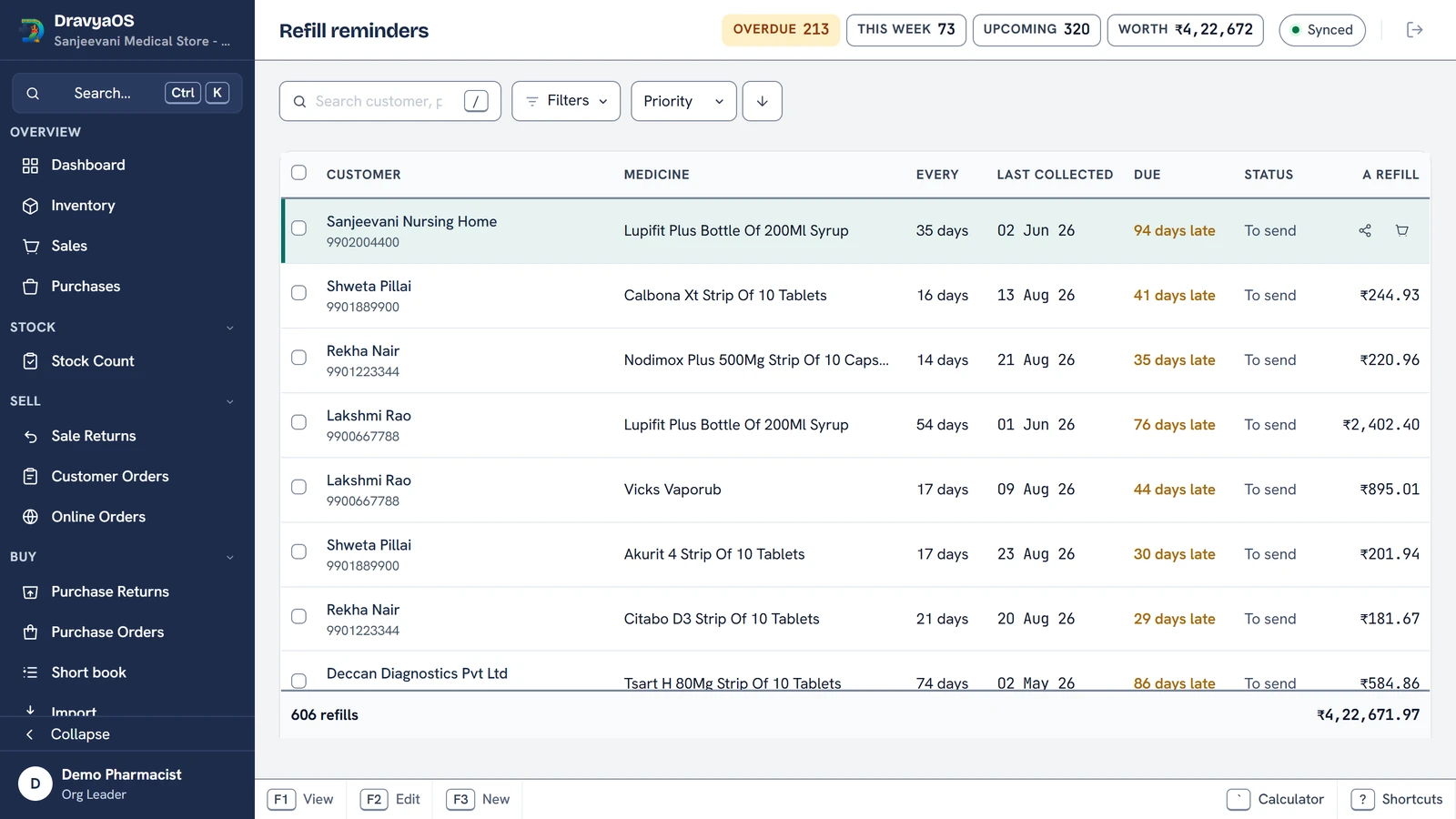
The list opens on who is overdue, most overdue first, ranked by how late they are against their own cycle and what a refill is worth. One tap drafts a message you can edit before it goes out on WhatsApp, or by SMS on Android. You can snooze it, mark it done, or stop reminders for that medicine. A "bill it" shortcut opens a new bill with the medicine already on it in their usual quantity, from the soonest in-date lot, so an expired pack is never offered. When the customer comes in and is billed, the refill is marked done by the purchase itself.
What this is, and isn't
This is a record of dispensing: who it was for, who prescribed it, and what paper backed it. It isn't a clinical file, it doesn't advise on doses or interactions, and it doesn't send reminders by itself. You review the list and press send, one chat at a time. And only bills that name a customer count, so a regular who is always billed as a walk-in is invisible. Get the name in once and the rest follows.
Rules on how long prescription records must be kept vary, so confirm the current position with your State drug control office.
Free for 3 days. Offline, and built for the counter.
Download DravyaOS for WindowsRelated reading: the Schedule H1 register, refill alerts and dead stock, and managing customer credit.